Every feature in RunSheets, explained.
From the first ticket to the final invoice, here's exactly what's inside your dispatch desk — technician dispatch, interactive map dispatch, multi-site customers, on-call escalation, and billing, all backed by a real Google Sheet that RunSheets sets up and manages for you.
What is RunSheets?
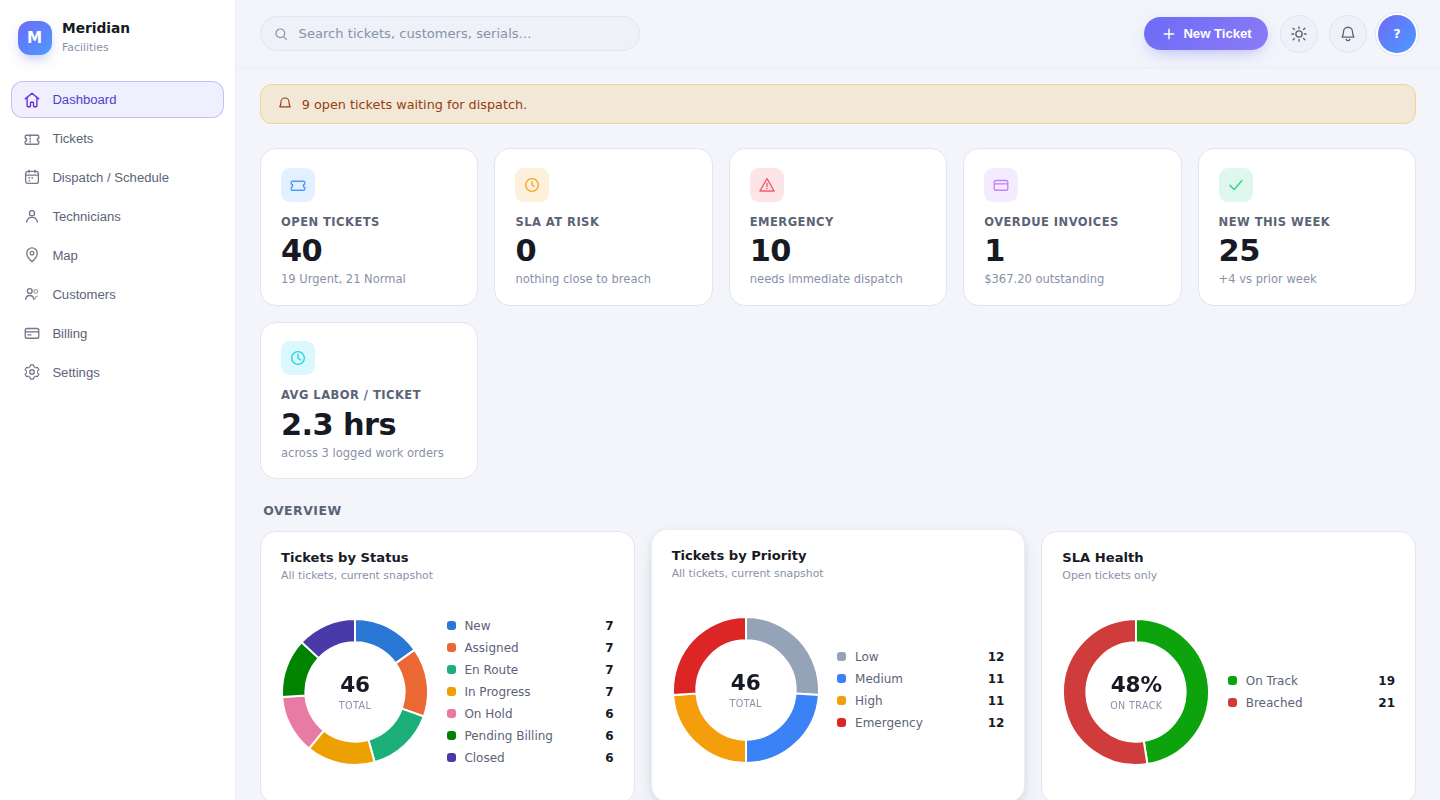
RunSheets is a full-service dispatch and ticketing platform for field service businesses — HVAC, electrical, plumbing, facilities maintenance, or any team that sends technicians out to a job site. It covers the whole loop: a ticket comes in, gets dispatched to the right technician, gets tracked against its SLA, gets resolved, and gets billed — with a dashboard that shows you exactly where things stand at every step.
The part that makes RunSheets different: there's no proprietary database underneath it. Every customer, ticket, invoice, and technician record lives in a real Google Sheet — one RunSheets sets up and manages for you, so there's no Google account or Workspace subscription for your team to run. RunSheets is the fast, secure, login-gated interface on top of it — dashboards, drag-and-drop dispatch, maps, and billing — without anyone touching a formula, and without your data being locked inside a system you'd need an export request to leave.
Everything your dispatch desk needs
AI Receptionist Integration AI-Powered
Never miss a call. Nagoh's AI Receptionist answers every inbound call 24/7 — in English or Spanish — transcribes it, and feeds it straight into RunSheets' existing on-call routing: a ticket gets created and the right technician gets notified automatically, even with no dispatcher on duty.
Tickets & Work Orders
Every job moves through a clear lifecycle — New, Assigned, En Route, In Progress, On Hold, Pending Billing, Closed — with priority, SLA due dates, and full resolution notes.
Email-to-Ticket
Forward an inbound email and RunSheets turns it into a ticket automatically, with a branded confirmation reply sent straight back to the customer.
Dispatch Board & Day Timeline
Drag and drop tickets across technicians on a live board, or switch to an hourly Gantt-style timeline to see exactly who's booked and when.
On-Call & Emergency Escalation
After-hours and emergency tickets automatically route to whoever's on call, with instant email and text notification.
Interactive Map Dispatch
Every open ticket with a resolvable address gets a pin on a live Google map — color-coded by priority, labeled with ticket number, customer, and assigned technician, so a dispatcher can see the whole day's workload geographically and route the next job to whoever's actually closest.
Multi-Site & Multi-Location Customers New
Landlords, property managers, and multi-building customers get a "Service Locations" list right on their profile — each with its own address and notes, one marked Primary. Pick the right site per ticket and the address flows through to the Customer card, the Dispatch board, and the Map automatically.
In-Line Customer & Household Management New
Creating a ticket for someone new? Add the customer or household without leaving the New Ticket modal — everything else you'd already typed (priority, category, description) stays right where you left it once the new customer record is saved.
Upcoming Installs Calendar New
A month view built specifically for install work — scheduled installations show up as chips on their day, and anything marked Installation without a date yet lands in an "Unscheduled Installs" list underneath so nothing falls through the cracks between quoting and the calendar.
Internal Job Tracking Sheet New
A non-QuickBooks internal cost log for every ticket — labor hours, parts ordered, parts cost, manufacturer notes, timestamped with who logged it. Kept completely separate from customer-facing Time & Material and invoicing, so office staff can track true job cost without it ever touching a bill.
Billing & Invoicing
Log time and material against a ticket, generate an itemized invoice, and download it as a PDF — client-side, with no extra setup required.
Audit Log & Activity Analytics
Every create, update, and delete is tracked with the real name of whoever did it — plus a built-in analytics view ranking who's closed the most tickets, an Important Events feed, and one-click filters for exactly what you're looking for.
Expense & Financial Tracking New
Log business expenses and income, set custom or recurring pricing for individual customers, and see revenue, expenses, profit, and margin on a dedicated Financials dashboard — for month-to-date, quarter-to-date, year-to-date, or any custom range.
Personalize Your Workspace New
Seven color palettes — including a High Contrast option and three colorblind-friendly palettes — plus saveable layout templates, so each team member's RunSheets looks and works the way they want.
Live Team Location Map New
An opt-in map overlay showing where your team currently is, right alongside your ticket pins — so a dispatcher can see the whole picture at a glance.
Customizable Dashboard New
Show, hide, and drag-and-drop reorder your Dashboard's stat tiles and charts, then save the layout that works for you.
RunSheets Copilot AI-Powered
Ask RunSheets questions about your own data in plain English, right from a dedicated Copilot page or the compact Dashboard widget.
Answer every call — even at 2 a.m.
Pair RunSheets with Nagoh's AI Receptionist and your dispatch desk stops missing calls. Inbound calls are answered instantly, logged automatically, and turned into a ticket that's already routed to whoever's on call — no dispatcher required outside business hours.
24/7 Bilingual Call Answering
Every call gets picked up instantly, day or night, weekends and holidays included — in English or Spanish, with a script custom-built for your business and services.
Zero Manual Data Entry
Calls are transcribed and logged automatically, then handed straight to RunSheets as a ticket — no one has to relay a message by hand or risk a transcription error.
Urgent Calls Escalate Automatically
An urgent call gets flagged and routed straight into RunSheets' existing on-call system — the same Emergency/After-Hours escalation your dispatch board already runs on.
Scales Without Adding Staff
Get the coverage of round-the-clock reception without round-the-clock payroll, with a live transfer to a real person whenever a caller needs one.
A separate add-on service from Nagoh Creative, built to plug directly into RunSheets' on-call routing — ask about it when you request a demo.
Built in Middle Georgia. Ready to run anywhere.
RunSheets runs for field service teams anywhere in the world — it isn't limited to any state or region. It just happens to have been built for a Middle Georgia field service business first, and it shows — SLA timing, after-hours escalation, and route-aware dispatch are all tuned by a real dispatch desk, not a generic national template. Whether you run a two-truck shop or a growing multi-crew operation, RunSheets scales from a single dispatcher to a full office team.
That's home base — Middle Georgia is simply where RunSheets was built and battle-tested first.
Your data stays yours
A real Google Sheet is the database
Customers, tickets, invoices, and technicians live in a real Google Sheet — hosted and managed by RunSheets, not a proprietary system you'd have to request an export from. No Google account or Workspace needed on your end.
RunSheets runs on top of it
A secured layer handles login, dispatch, dashboards, maps, and billing — reading and writing to that Sheet through a locked-down API, never exposing it directly.
Your team logs in and dispatches
One login screen for your whole team, real names on every action in the audit log, and a dashboard built for the pace of a dispatch desk.
Built for field service teams
RunSheets started as a custom dispatch system built for a field service client juggling emergency calls, technician schedules, and paper work orders. Nagoh Creative, the website, app, and software design studio behind it, has grown it since into a product any field service business can run — dispatch, billing, and everything in between — with that original client as customer #1.
Ready to get started?
Tell us a bit about your team and we'll get you set up with a demo.
Prefer email? support@nagoh.us